Applying a patch (the guarded change flow)
Every change in HostCrust — a package patch, a kernel update, a reboot, a service restart — follows the same path: request → policy → approval → run → verify → receipt. You start from the Patch Proof results; HostCrust handles the rest and records it.
In the app: Open the Servers page Set your action policy
Changes are deliberately not one click. HostCrust makes every change go through the same six steps so that a person is accountable, the server stays in control of what it will run, and you end up with proof. This page follows a patch from the Patch Proof results to the receipt.
The flow, end to end
- Request — someone asks for a specific change on a specific server.
- Policy — your org's action policy decides whether that class runs automatically, waits for approval, or is blocked.
- Approval — unless the policy auto-runs it, an approver reviews the exact action and approves or rejects it.
- Run — the server picks the change up on its next check-in and runs it, if its own agent.conf allows that class.
- Verify — HostCrust confirms the change took effect.
- Receipt — the whole thing is recorded in a receipt you can export.
1. Start the request from Patch Proof
On a server's Open tab, when there are package fixes, you'll see:
N open CVEs have a published fix. Apply the package fixes now, or patch everything (incl. the kernel) and reboot.
with two actions, Patch these and Patch everything + reboot. You can also start any change from the Request a change card lower on the page, which lists each option and tells you what your policy and the server's agent.conf will do with it.
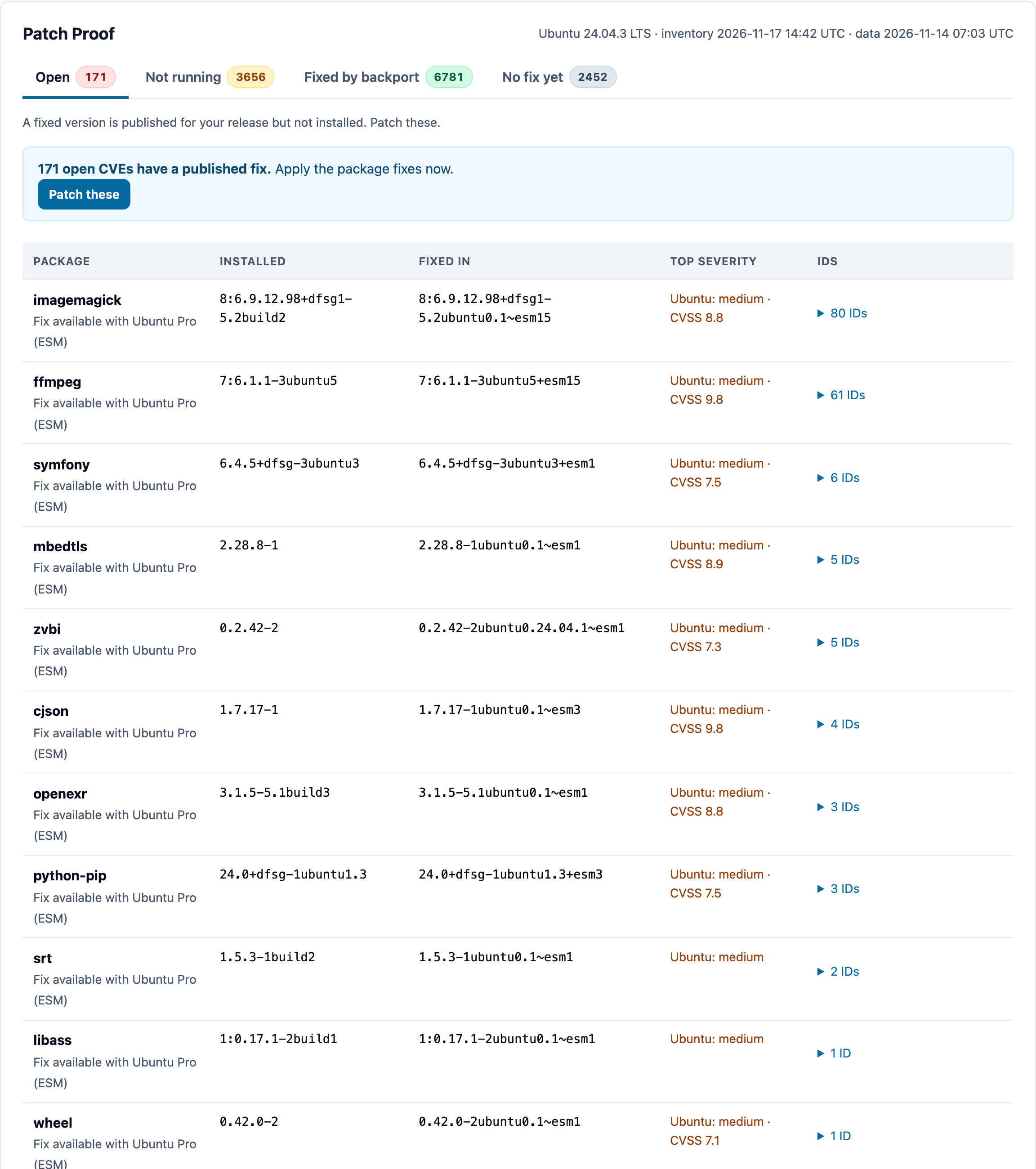
Patch these (packages, not the kernel)
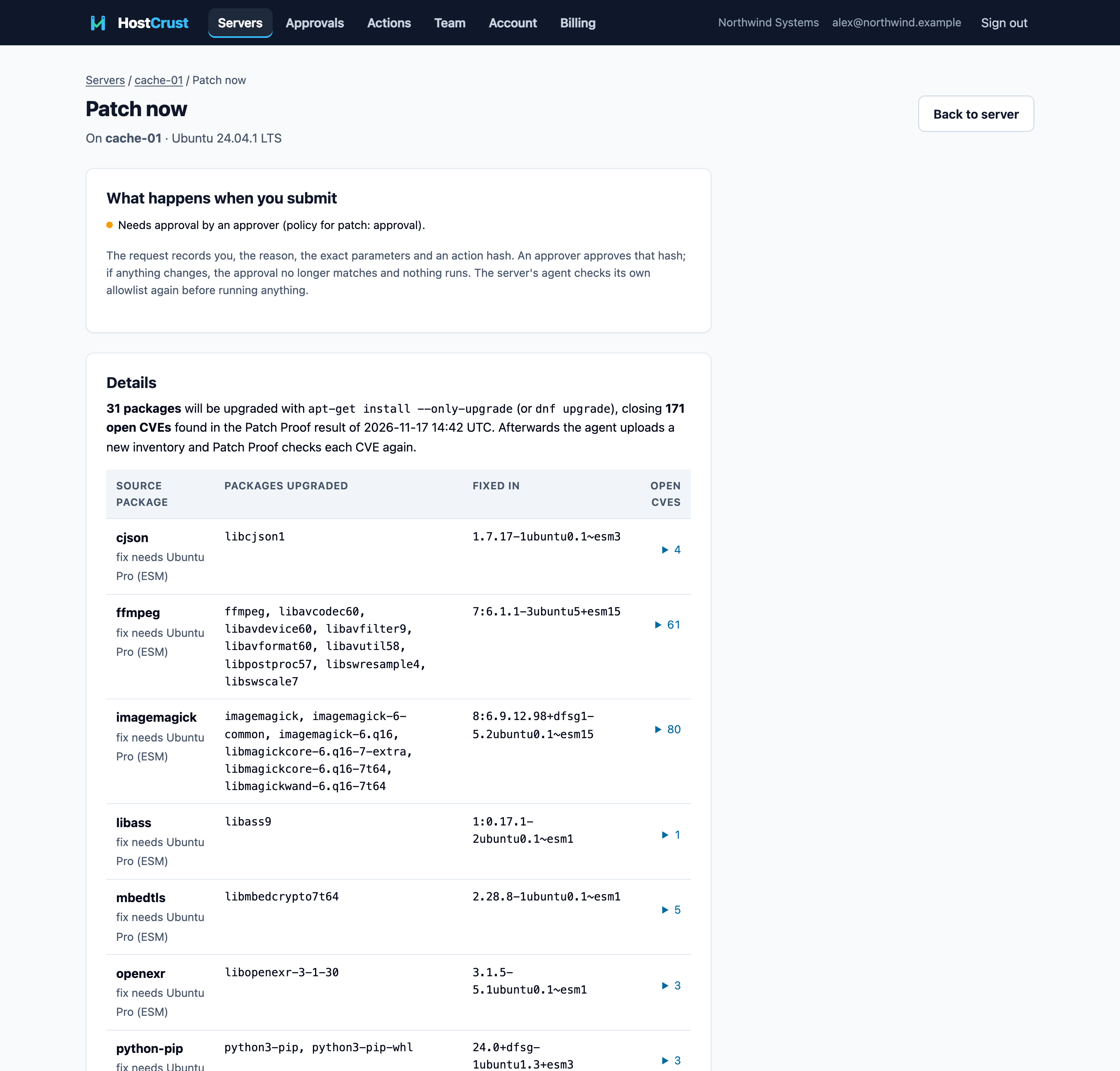
Patch these upgrades just the packages that have an open fix, with apt-get install --only-upgrade (or dnf upgrade). The review screen lists every package it will upgrade and the CVEs each one closes, so you approve a precise set — not "update everything". Afterwards the agent uploads a new inventory and Patch Proof checks each CVE again.
Patch everything + reboot (the kernel path)
A new kernel is a new package, and it only takes effect after a reboot — so a kernel fix can't be applied with Patch these. When a server's only open fixes are kernel CVEs, the Open tab leads with Patch everything + reboot:
N open CVEs — these are kernel fixes. A new kernel installs with everything else and takes effect after a reboot.
This path upgrades every package with an available update (apt-get -y --with-new-pkgs upgrade or dnf -y upgrade), including new kernels, and reboots. Services aren't restarted automatically; restarts and reboots are separate, explicit requests. If a fix is installed but Not running, the Not-running tab instead offers Reboot to apply.
2. Policy decides what happens next
When you submit, the "What happens when you submit" box tells you the outcome for this action, based on your organization's action policy. Each class of action can be set to run automatically, wait for approval, or be blocked. Two limits always apply on top of the policy:
- AI agents always need approval — whatever the policy says, a request from an AI agent waits for a person.
- The server has the final say — each server's agent.conf decides which classes it will ever run, and an approval covers only the exact action it was given.
Admins and Owners set the policy on Team → Action policy. The submit button reads Request approval when approval is needed, or Run it when the policy runs it automatically.
3. Approval
If approval is needed, the request appears on the Approvals page for anyone who can approve. HostCrust asks the approver for a fresh two-factor check before they decide, and they approve the exact action hash. See Approvals for the approver's side.
4. Run on the next check-in
Once approved (or auto-run), the change is queued. The server picks it up on its next check-in — usually within seconds — and runs it, after its agent re-checks its own allowlist. You'll see the request move from Requested to approved to running in the server's recent actions.
5. Verify
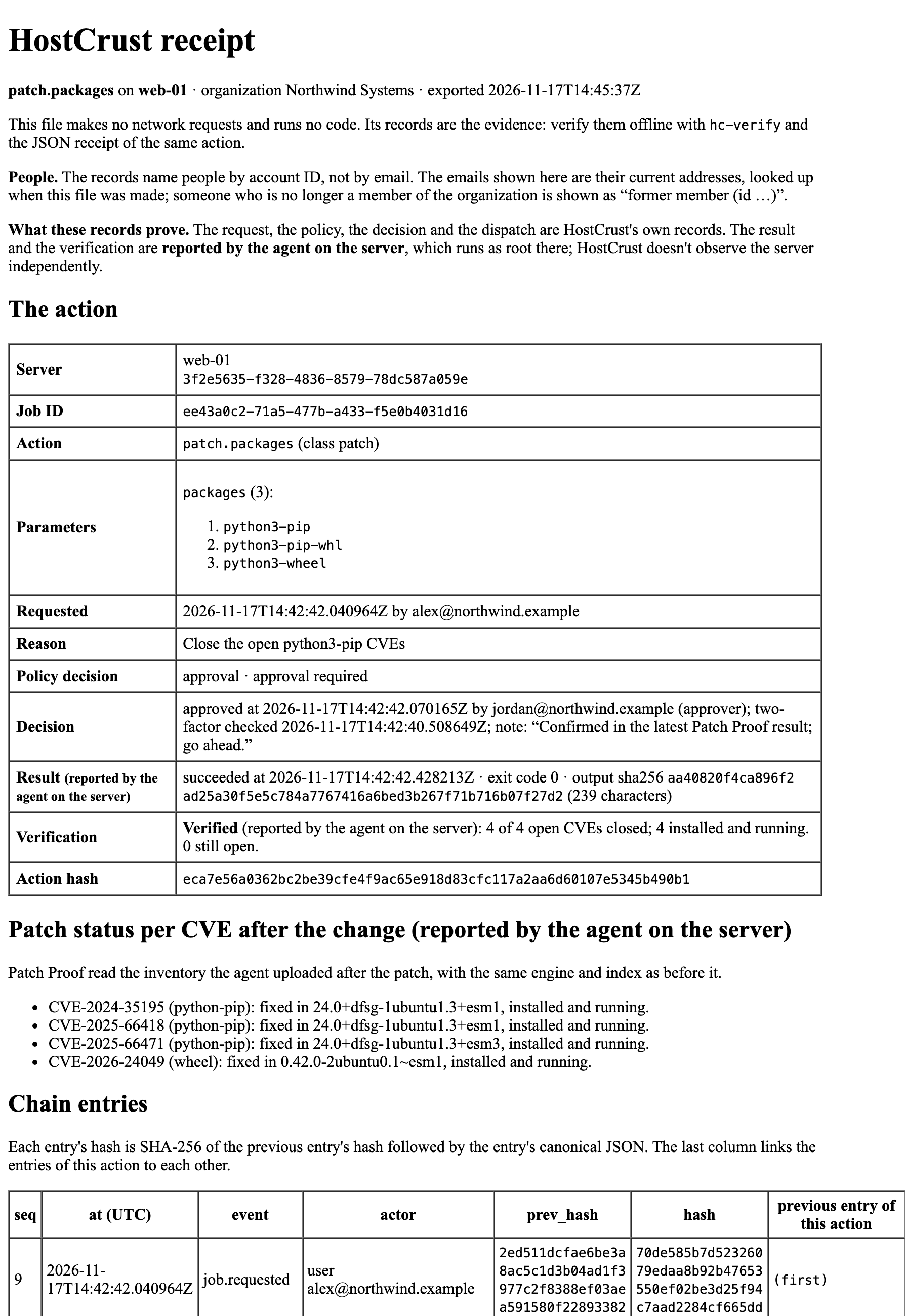
HostCrust doesn't take "ran successfully" as proof the problem is gone. After a patch, the agent uploads a fresh inventory and Patch Proof re-checks each CVE the change was meant to close. After a reboot, HostCrust confirms the server came back with a new boot ID. After a service restart, it checks the unit is active again.
Being honest about the trust boundary: the result and verification are what the server's own agent reports — HostCrust doesn't observe your server independently. Patch Proof's per-CVE check runs on HostCrust's side, against the inventory the agent uploads. What HostCrust itself can prove is the record: the request, policy, decision and dispatch are hash-chained, so they can't be altered after the fact.
6. Receipt
Every change is recorded in a receipt: who requested it and why, the exact parameters and action hash, who approved it, what ran, and what verification found. The receipt is a self-contained document (it makes no network requests and runs no code), its records are hash-chained and append-only, and you can verify them offline with the open-source hc-verify. Admins can export the whole organization's receipts.
This documents the HostCrust product as of November 17, 2026. The screenshots are from the app.
FAQ
What's the difference between "Patch these" and "Patch everything + reboot"?
Patch these upgrades the specific packages that have an open fix, and skips the kernel. Patch everything + reboot upgrades every package including new kernels, and reboots so the new kernel runs. Because a new kernel is a new package that only takes effect after a reboot, kernel fixes need the second path.
Can a change run without anyone approving it?
Only if your organization's action policy sets that class to run automatically. By default a change waits for a person. A request from an AI agent always waits for a person, whatever the policy says.
What stops an approved change from doing something different when it runs?
The request records the exact parameters and an action hash, and the approver approves that hash. If anything changes, the approval no longer matches and nothing runs. The server's agent also re-checks its own allowlist before running anything.
How do I know a patch actually worked?
After the change runs, HostCrust verifies it: for a patch, the agent uploads a new inventory and Patch Proof re-checks each CVE; for a reboot, HostCrust confirms the server came back with a new boot ID. The result is written to a receipt you can export.